The first-person climbing survival horror, ‘Below The Blades’, is coming to Steam on November 12th
Press release:
London, UK (07/10/2026) - Ten Image Publishing today revealed Below The Blades from D[...]




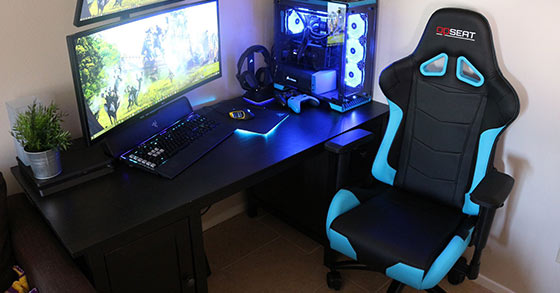
Throwing together a bunch of PC game components in a slapdash fashion will almost always result in a subpar gaming experience. In order to ensure comfortable and hassle-free gaming, a few simple set up decisions go a long way. Here are some essentials when getting a PC and accessories in place:
When adjusting a keyboard tray, always make sure that it is low enough that arms are in a downward sloping position when touching it. Any upward reach to a keyboard will result in wrist and hand strain. While many keyboards have little props at the top to tilt it up and toward the user, the opposite is more ergonomic. If possible, have the keyboard higher at the bottom so that the hands follow the gentle slope downwards.
With regards to a mouse, it is important to test a number of shapes and sizes to determine what size and shape feels the most intuitive. Always choose a dark mouse pad, as optical and laser mice need a dark surface to be at their most precise.
The importance of a good gaming chair cannot be overemphasized. Lengthy gaming campaigns require a comfortable, supportive gaming chair with as many adjustment options as possible. A plastic or rubber mat under the chair is advisable, as they make any necessary motion smooth and unhindered.
Regardless of how well-cooled a computer is, placing it where it will be cramped or exposed to sunlight for extended periods of time can cause overheating. Make sure the PC has at least three inches of distance on all sides from any surface. This will allow the computer cooling system to have enough room to dispel hot air properly.
Also, make sure the computer is not sitting flush on the floor. It needs at least an inch under the case of open space.
While it may be trendy or look cool to attach a monitor to a wall, this is really only a good idea if space is at a premium. For the best possible configuration, a solid computer desk is the way to go. The best desks will have multiple adjustment options and storage for any game paraphernalia.
Once the monitor is on the desk, the most obvious need is to have it facing away from any source of outdoor light. A dimly-lit corner of a room would be an ideal location to allow the brightness of the monitor to show through. Make sure the middle of the monitor is exactly at eye level. This will prevent neck strain from looking up or down at the monitor over long periods of time.
There’s nothing as frustrating as attempting to move a mouse during a crucial moment of a game only to find that the cord is stuck on something. Yes, computers have a lot of wires, but they don’t have to get in the way. Using zip ties to bundle wires into neat groupings that stay put will help prevent inadvertent tangling or getting them caught on part of the desk.
Having all a computer’s components lodged in the case is the simplest way to go, but if external devices will be used, their placement is important. Whether it be an external sound card, DVD drive, or another device, it is best not to set it on the computer. Using a small table or stand set next to the computer is a good option. Alternatively, if the floor is something other than carpet, the device can be set on the floor itself somewhere where it won’t be stepped on.
A little preparation can make a major difference in gaming enjoyment and quality. Take the time to organize carefully for the best results.

Jonas “O.J” Ek
The Gaming Ground
Twitter: @TheGamingGround
More by Jonas Ek:
Tags: Gamer, Gamers, Gaming, Gaming environment, OPseat, PC Gaming, Video games