The atmospheric puzzlebox, ‘The House Dreams Along With Them’, is coming to Steam on November 10th
Press release:
Washington, United States - October 22nd, 2026 - Solo indie dev Jeffrey Nordin is tod[...]





Hey there farmers and simulator fans! As we wait to learn new features, crops, maps and equipment that will change how we farm in our virtual worlds with the release of Farming Simulator 25, we have prepared this FS25 Mods guide. As usual, mods will play a big part when it comes to improving your game if you are an experienced FS veteran, or next-leveling as someone who has just got into this agricultural-fueled odyssey.
Then we will take the plunge to know how you can download, install and manage mods in FS25 together with references from some of the game features presented via a latest gameplay trailer.

It’s just one of those days…
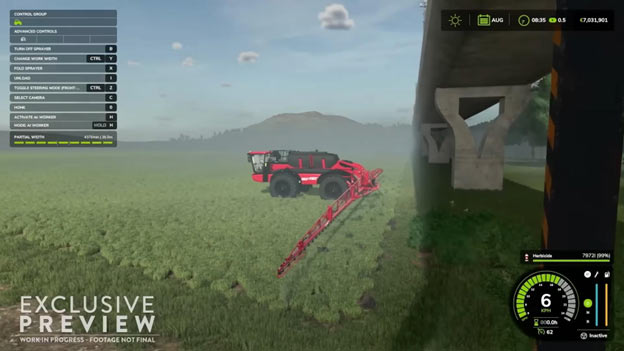
Prior to opening Pandora’s box of modding, allow me to make a short digression over one of the recent gameplay trailers and a few screen captures that are worth mentioning. These teasers underline not only the desired features of FS25 but also the environment within which modifications will be most beneficial:
Ensuring your system is ready for FS25 is crucial for a seamless gaming experience. While some of these may still change over time, the basic requirements are these:
| Minimum | Recommended | |
| OS | Windows 10 64bit | |
| Processor | Intel Core i5-6400, AMD Ryzen 5 1400 | Intel Core i7-10700, AMD Ryzen 7 3800X |
| Memory | 8 GB RAM | 12 GB RAM |
| Graphics | Nvidia GeForce GTX 1050Ti, AMD Radeon RX 470 graphics card or better (min 3GB VRAM, DX12 support) | Nvidia GeForce RTX 2070, AMD Radeon RX 5700 XT, Intel Arc A750 graphics card or better (min 8GB VRAM, DX12 support) |
| DirectX | Version 12 | |
| Storage | 45 GB available space | |

Thank God for mods indeed.
The creativity and innovation of the community of the Farming Simulator are well known and of course it is in the mods where the FS25 universe really comes into its own. Here are some of the utmost popular places you could come across mods:
To sum it up, let’s look at this table:
| Source | Pros | Cons |
| Official ModHub | Trusted, verified mods, easy access | Limited variety of mods, slow approval times, restrictions on what mods can be published |
| Community Sites | Larger mod selection, fast or instant mod approval times, large community of gaming fans, | May contain unverified content |
| File Hosts | Access to newest mods pre-official | Potential security risks |
Thankfully enough, it’s rather easy to install mods in FS25.
After selecting the mods, the next process is the installation of the selected addons. Don’t worry – it is quite simple!
Go to the required mod, hit ‘Download’, and relax, FS25 will do everything for you. That’s all!
Talking about installation of mods in a more manual way, it is actually a bit tricky, first you have to download the mod file, which often comes in .zip form. After that you have to search for your FS25 mod folder, the contents of which will vary according to the OS you are using and the method which you acquired the game from.
For Windows users, mods folder is:
C:\Users\[Your name]\Documents\My Games\Farming Simulator 25\mods
For macOS users, if game is installed via Steam, folder will be:
~/Library/Containers/com.focus-home.farmingsim25/Data/Library/Application Support/FarmingSimulator25/mods
For macOS users, if game is installed via App Store, folder will be:
C:\Users\[Your name]\Documents\My Games\Farming Simulator 25\mods
Finally, you need to copy and paste the mod file into your mods folder. That should be it!
Please note – if for some reason mod installation fails, make sure to check the following:
So, whether you are a veteran gamer looking to get that last bit of productivity from your farm or just starting into the Farming Simulator modding world, FS25 is waiting for you. With more of our own mods on the way and ever-greater quantities of foreign user mods to sweeten your virtual farming experience, your farm is only one more download away. When the launch date is almost here, the Farming Simulator community is alive with anticipation. Be prepared; have fun and above all keep informed, as you seed, grow, and harvest your way to a prosperous virtual farming year. If you haven’t yet ordered your copy of FS25, you might want to get down now and do it.
More by Guest Author:
Tags: Farming, Farming simulator, Farming Simulator 25, GIANTS Software, Indie games, PC games, PS5, Simulator, Xbox Series X